
Index

ENCRYPTED ELN
For uncompromised security, BiochemLabSolutions ELN seamlessly integrates with TrueCrypt. TrueCrypt is an open-source and free encryption program that provides protection up to "top secret" US government classification level.
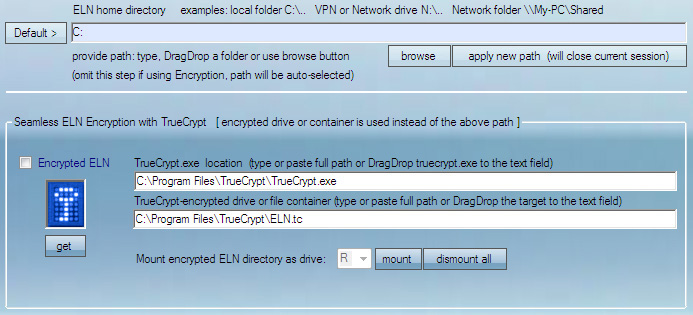
Requirements:
(1) TrueCrypt must be installed on the computer. Full path to Truecrypt.exe should be provided in the Directories and Encryption menu.
(2) Encrypted container should be created using TrueCrypt. Full path to the encrypted container should be provided in the Directories and Encryption menu.
(3) Encrypted ELN option must be checked in Directories and Encryption.
(4) ELN mounting drive letter should be chosen in Directories and Encryption.
When the above requirements are met, BiochemLabSolutions will prompt for a password on each startup and will begin working in a secure mode if correct password is entered. All ELN records and data files will be directly written to and read from the encrypted location. In the encrypted mode all functions of ELN can be used and Projects and Notes created and edited as in the unencrypted mode.
The ELN will monitor and show encrypted free space available ("MB free"). When encryption is in effect, the address box in the Editor is colored red.
Encrypted location is closed automatically and all ELN data are locked at the bit level upon exiting the BiochemLabSolutions ELN program.
Encryption is deniable (consult TrueCrypt web site about plausible deniability).
USING TWO ELNs, ONE ENCRYPTED AND ONE OPEN TEXT
It is possible to have both encrypted and unencrypted ELN and switch regularly between them. Switching is achieved by changing the option (3) above and restarting the BiochemLabSolutions ELN.